Data Recovery Scenarios

Supports All File Types, Formats, and Storage Devices

XRecovery data Recovery software is designed for maximum compatibility. No matter where your data isstored or what format it is in, XRecovery ensures a smooth and efficient recovery process.

Document

DOC, DOCX, RTF, XLS, XLSX, XLSB, PPT, PPTX, PPS, PDF, DOT, DOTX,

Photos

CRW, JPEG, JPG, PNG, PSD, RAW, RGB, 3DM, 3DMF, 3FR, ABM

Video

AVI, FLA, FLV, M4V, MOV, MP4, WMV, 3G2, 3GP, 3GP2, 3GPP

Audio

AAC, AIFF, ALAC, FLAC, MP3, OGG, PCM, WAV, WMA

Email

MSG, PST, OST, EML, EMLX, MBOX, EPUB, JIS, KEY

Folders

7Z, WAR, ZIP, exe, 7zip, etc.RAR,TAR.GZ

Recovery Solution for All Storage Devices Supported

XRecovery Data Recovery provides an efficient way to restore lost or deleted data caused by system crashes,
formatting, accidental deletion, virus attack, partition loss, drive errors, and other issues.

Hard Disk

Supports all major hard drive brands.

Sorry, we couldn't find any posts. Please try a different search.

PC/Laptop

Compatible with all PC and laptop brands.

XRecovery-Download-Page

You can download 64-bit and 32-bit programs and some patches for win7
Read More →

SSD

Compatible with leading SSD brands.

Sorry, we couldn't find any posts. Please try a different search.

SD Card

Compatible with all major memory card brands.

Sorry, we couldn't find any posts. Please try a different search.

USB

Works with all major USB drive brands.

Sorry, we couldn't find any posts. Please try a different search.

External Drive

Works seamlessly with top external drive brands.

Sorry, we couldn't find any posts. Please try a different search.

Why Choose XRecovery?

Simple Interface

No technical skills required. Our intuitive wizard guides you through every step.


Deep Scanning Modes

Multiple scan options from Quick Scan to Deep Scan ensure maximum results.


Widespread File Support

Supports thousands of file types for photos, videos, documents, and archives.


Risk-Free Operation

Our software reads your data without modification, ensuring zero risk.


Recover Your Lost Files in Just 3 Simple Steps

Follow these simple steps to recover lost or deleted files with XRecovery for Windows

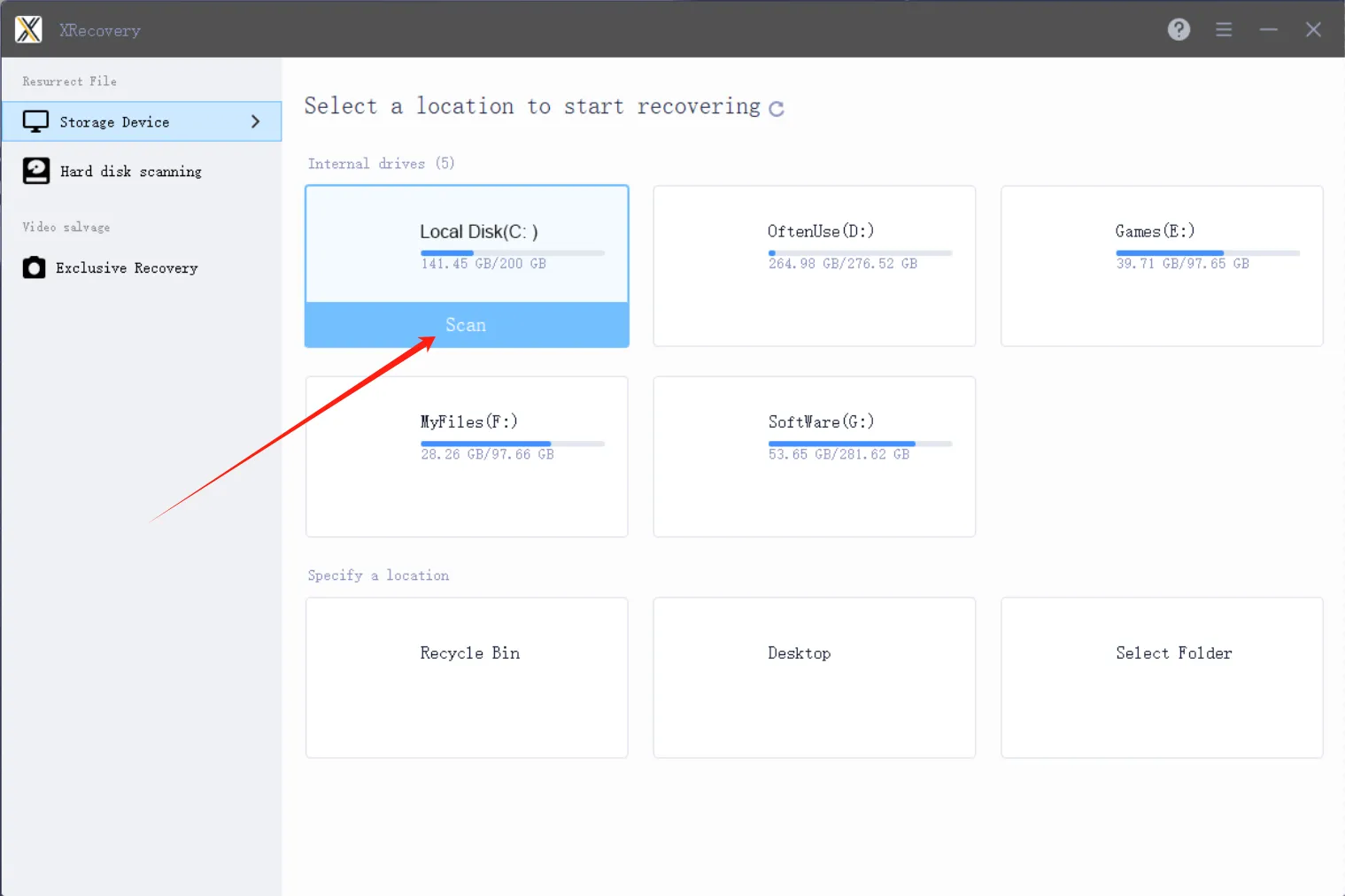
1.Start Scanning for Lost Hard Drive Data

Launch XRecovery and select the disk to scan

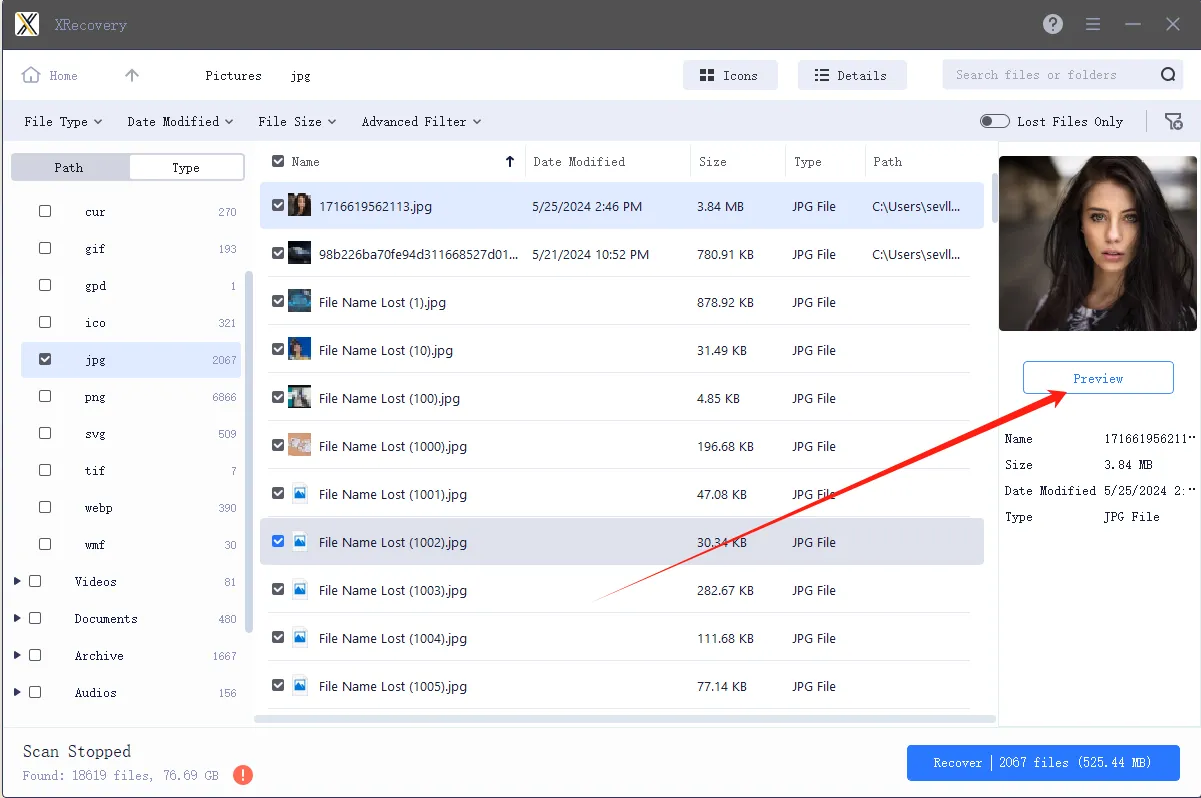
2.Select Which Files You Want to Recover from Your Hard Drive

Locate and preview the lost or deleted files

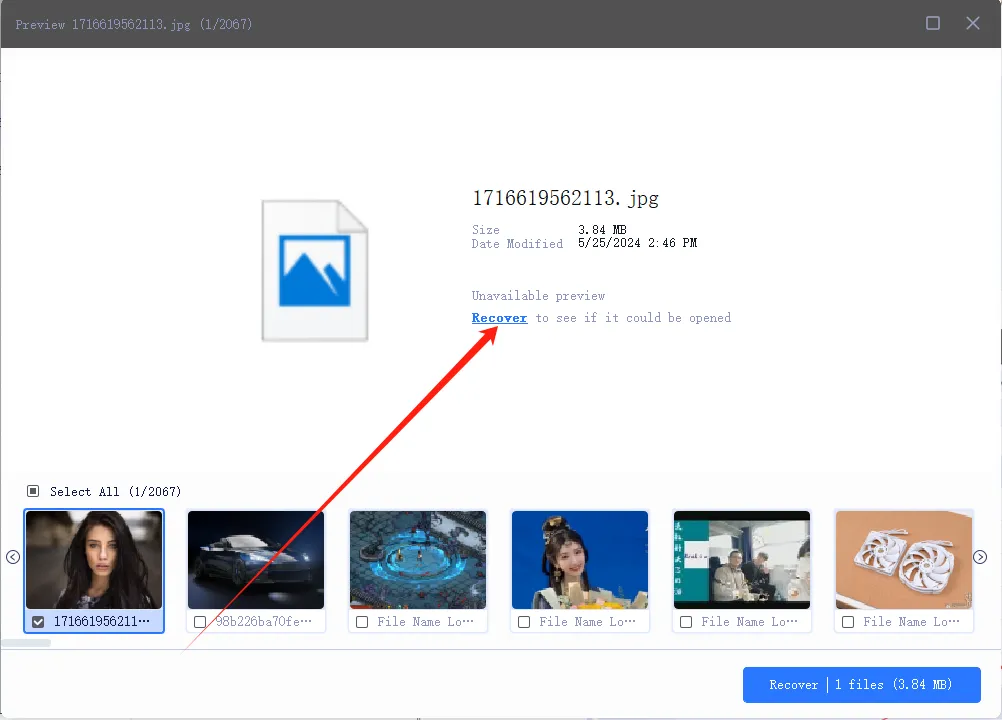
3.Recover the Deleted Hard Drive Data

Restore your data with one click

Customers and software guru say

Ela Orleans
Ela Orleans
Digital reviewer
The free version of XRecovery comes with no functional limitations and delivers an impressively high success rate. I can use the free quota every day without restrictions, and the Pro version is very reasonably priced. I rely on it constantly—it’s become an essential part of my workflow.
John Doe
John Doe
Sound and visual artist
After a hard drive failure, I lost several critical files for upcoming video projects. Huge thanks to @XAppset and their software XRecovery for helping me recover everything I needed. Truly a lifesaver.
John Doe
John Doe
Video creator
Due to hard drive corruption some very important files of some upcoming videos have been lost.
Must thank @XAppset and their software XRecovery for helping me get these files back!

FAQ

In many cases, yes. The key is to stop writing to the affected drive and run a read-only scan as soon as possible to maximize recovery chances.

Often yes, especially after a quick format. A deep scan can recover more fragmented or partially overwritten data.

Most common files can be fully recovered. Heavily fragmented or partially overwritten files may be incomplete and could require repair.

Yes. XRecovery uses a guided interface and defaults to read-only operations to minimize risk and simplify the recovery process.

It depends on the drive size, condition, and scan type. A quick scan usually takes minutes; a deep sector-level scan can take hours. Avoid interrupting the process and ensure the device has stable power.

XRecovery-background-00005
XRecovery-logo-00001

All Files, All Formats, All Devices Restore
Your Lost Data Efficiently

Privacy Overview
XAppSet

This website uses cookies so that we can provide you with the best user experience possible. Cookie information is stored in your browser and performs functions such as recognising you when you return to our website and helping our team to understand which sections of the website you find most interesting and useful. Learn more

Strictly Necessary Cookies

Strictly Necessary Cookie should be enabled at all times so that we can save your preferences for cookie settings.