
To backup photos without laptop, you need three things and no more: a destination that is not the card, a way to move bytes into it, and a check that the bytes arrived. The hard part is the third. Field offloads fail quietly, because a copy interrupted by a brownout or a loose cable leaves a file that exists, carries a plausible size, and will not open. The card has usually been formatted by the time anyone finds out.
This page covers the four workable physical setups for offloading without a computer, then spends most of its length on verification and power, which are the two areas where field backups actually break. The habits that turn any of these setups into a repeatable routine are the same ones described in the 3-2-1 backup rule; what changes in the field is that you have less power, fewer ports, and no second chance.
What “No Laptop” Actually Rules Out
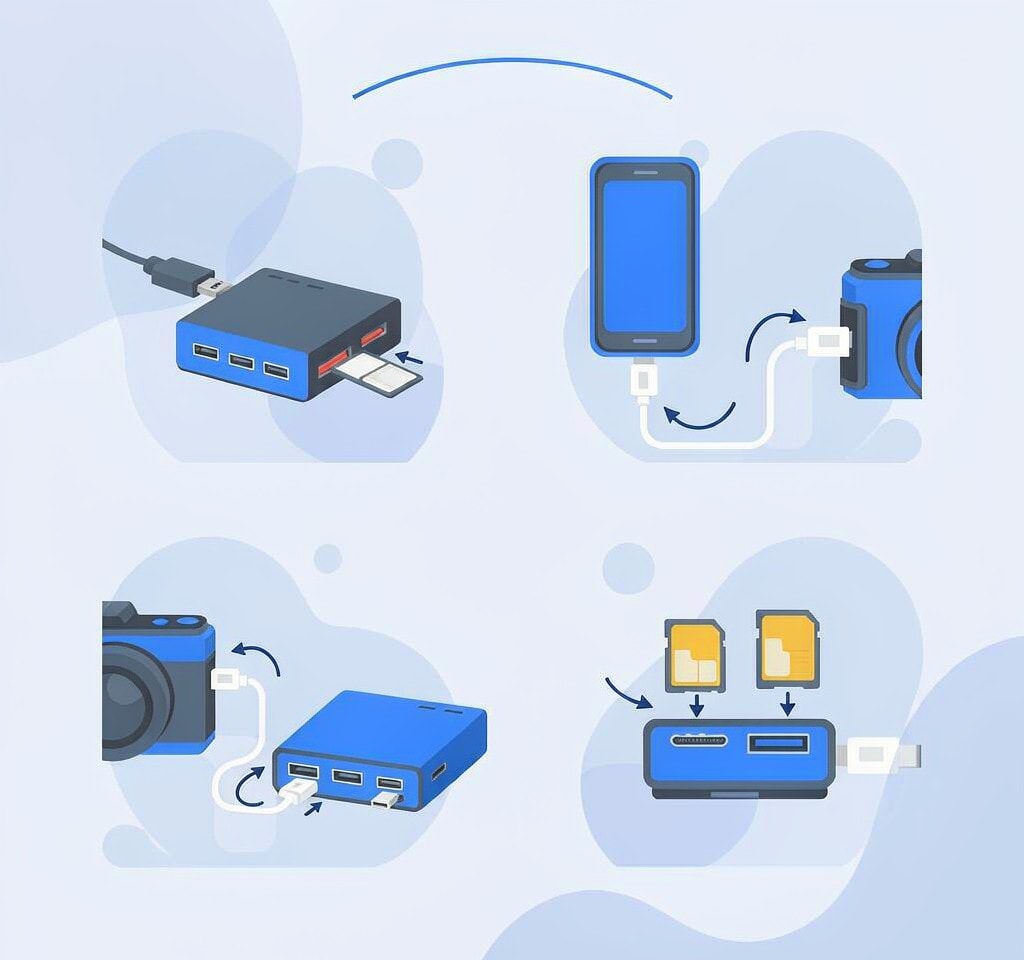
Removing the laptop removes a file system, a large screen for inspecting thumbnails, a mains power source, and a computer that can run a checksum utility. What you keep is the ability to copy from one device to another and to count the result, and that turns out to be enough. The failure modes that matter in the field are not silent bit rot; they are interruptions, bad cables, insufficient current, and cards that were never verified before they left the studio.
The step people skip is the one that matters most: an offload is not finished when the progress bar completes. It is finished when a specific set of conditions has been checked and the source can be released.
Four Field Offload Paths, Compared
| Path | What you carry | Speed | Best for | Main weakness |
|---|---|---|---|---|
| Portable SSD with built-in reader | One device, one cable | High, 300–1000 MB/s | Multi-day outings with mains charging at night | Needs stable power; a single point of failure |
| Phone or tablet as host | Card reader plus phone | Medium, 30–90 MB/s | Travel and one-camera trips | Limited ports and power; app-dependent |
| Camera records direct to SSD | Camera plus USB-C SSD | High | Long-form video shoots | Only on supported bodies; no second copy |
| Two readers, two drives | Two readers, two SSDs, hub | High | Paid work with a fixed base | More cabling, more power draw, more to get wrong |
No path creates a second copy on its own. Each moves data from a card to a drive, which is a migration, not a backup. The second copy is a separate decision, and it determines whether one failed drive ends a shoot.
Paths One and Two: A Portable SSD, or a Phone as Host
A portable SSD with a built-in card reader is the strongest general-purpose option and the one most field photographers settle on. Two details separate a good unit from a frustrating one. Look for a device that copies the card’s contents without reformatting or reorganizing them, because some field drives interpose their own folder scheme, which is convenient until you need to match files to a shot list. And confirm the unit reports a verification result rather than a bare completion: a device that says “done” has told you nothing, while one that says “1,247 files, 63.2 GB, verified” has.
Capacity planning is the practical limit. A 1 TB drive holds roughly two 256 GB cards and change, and the temptation in the field is to keep copying until it is full. A drive at 95 percent cannot hold a complete offload when you need it, and a partially completed copy is worse than a postponed one.
A phone with a card reader and a file manager will also copy a card, and for a single-camera trip that is often sufficient. It is the setup most likely to fail for reasons that have nothing to do with the files. Phone storage fills fast, so the destination is usually an external drive competing with the card reader for one port. Phone file managers vary in whether they report progress accurately, and the operating system may suspend a long copy when the screen locks. If you use this path, set auto-lock to never, keep the phone on power, and treat any copy that spans a screen lock as unverified.
Paths Three and Four: Direct-to-SSD, and a Two-Reader Base
Several current bodies record video directly to a USB-C SSD, skipping the card entirely. For long interviews and event work this removes a transfer step, and it removes a second copy as well. Footage on a single SSD exists once, in a device easier to lose or drop than a card. The correct use of direct-to-SSD recording is as a primary with the card slot still active, which is the arrangement covered in a dual card slot setup.
When there is a fixed base — a tent, a vehicle, a hotel room — the fastest reliable arrangement is two readers on a powered hub, copying to two drives at once. Two cautions apply. Simultaneous copies split the available current and bandwidth, so a hub adequate for one drive may brown out with two. And parallel copies make verification harder, because two progress views compete for attention. Verify sequentially: let both runs finish, then check each destination separately, one card at a time.
Verification: File Count, Total Size, and One Playback
A completed progress bar means the copy operation returned without error. It does not mean the data is on the destination. Operating systems and portable drives buffer writes, and a connection lost at the wrong moment can leave a file whose directory entry and recorded size were committed while its final blocks never were. That file appears in the file count, contributes its full size to the total, and fails to open.
So verify in three passes, in ascending order of cost:
- File count. Compare the number of files on the source and the destination. A missing file usually means a folder was skipped or a hidden system directory confused the copy tool.
- Total size. Compare the byte total, not the “size on disk” figure. A destination reporting slightly more is normal; one reporting less has lost payload.
- Spot playback. Open three files: the first of the shoot, the last one written, and one from the middle. Play each for a few seconds. The last file is the one most likely to be truncated, because it is the one the interrupted copy was working on.
For video, a truncated file is easy to spot because most players report duration. A clip that shows four minutes but stops at forty seconds was cut off. Those files are frequently repairable, since the recorded frames are present and only the container index is incomplete — the mechanics are in repairing video files that will not play — but the repair is work you should not have to do.
Power Is the Failure Mode Nobody Plans For

The most common cause of a half-finished field backup is not a bad drive. It is a drive that lost current mid-write.
Bus-powered SSDs draw far more current while writing than while idle, and the draw rises as the drive’s cache fills. A phone, a small hub, or a camera’s USB port may supply enough for enumeration and not enough for sustained writing. The result is often not an error message but a stalled copy or a drive that disconnects and remounts, leaving a partial file behind.
Three habits eliminate most of this. Use externally powered storage where possible, since a drive or hub with its own supply removes the constraint. Charge the host before you copy rather than during it, because a phone at 15 percent that begins a forty-minute offload will interrupt it. And copy sequentially rather than simultaneously when power is marginal, since two writes at once double the peak draw and halve the headroom.
The same logic applies to the source side. A camera that has been recording in cold conditions may have a battery that reports a healthy percentage and cannot deliver sustained current, which is why the drone and action camera backup routines treat battery state as part of the offload plan. A card pulled from a device mid-write can itself carry a truncated file, and the fix starts with the device, not the card.
The Daily Rhythm
A field workflow survives on repetition rather than sophistication. At the end of each shooting day: copy every card to the primary drive, verify by count, size, and spot playback, then copy the day’s folder to the second destination and verify it the same way. Only after both destinations pass is the card formatted, in the camera, using the camera’s own menu. Before a card returns to service, confirm its health has been checked recently — the warning signs are in testing a card’s health.
When you pull a drive from a reader, eject it properly rather than yanking the cable. On a computer that means the eject command; on a phone or field drive it means the disconnect option in the file manager. The reason is identical to the one behind safely ejecting a card: an unmounted write cache can leave a file that looks complete and is not.
If an offload does go wrong and a card is reused or reformatted before the gap is noticed, the situation is recoverable more often than people expect, provided the card has not been written to since. If you are on Windows and the card is still detected by a computer, a purpose-built recovery tool such as XRecovery (xappset.com) can scan SD, microSD, and other memory cards for deleted or formatted photos and videos. As with any recovery tool, stop writing to the card first and always save recovered files to a different drive. Data that has not been overwritten comes back in full, and data that has been overwritten does not come back at all.
Frequently Asked Questions
Can I back up photos without a laptop in the field?
Yes. Use a portable SSD with a built-in card reader, a phone with a card reader and an external drive, a camera that records directly to SSD, or two readers attached to a powered hub. Any of these moves the files off the card; all of them still require a separate second copy.
How do I know a field backup actually completed?
Do not trust the progress bar. Compare file count and total byte size between source and destination, then play the last file the copy wrote. A truncated file keeps its recorded size, so a matching total does not prove the payload arrived.
Why does my portable SSD stop mid-copy?
Almost always current, not capacity. Bus-powered drives draw their highest current during sustained writes, and a phone, small hub, or camera port may not supply it. Use externally powered storage, charge the host first, and copy to one destination at a time.
Is one copy on an SSD enough for a shoot?
No. A single drive is a single point of failure, and portable drives are the most easily lost item in a camera bag. Keep at least two copies in separate physical locations before you format the card, which is the minimum the 3-2-1 rule describes.