Applications
Supports All File Types, Formats, and Storage Devices
XRecovery data Recovery software is designed for maximum compatibility. No matter where your data isstored or what format it is in, XRecovery ensures a smooth and efficient recovery process.
Document
DOC, DOCX, RTF, XLS, XLSX, XLSB, PPT, PPTX, PPS, PDF, DOT, DOTX,
Photos
CRW, JPEG, JPG, PNG, PSD, RAW, RGB, 3DM, 3DMF, 3FR, ABM
Video
AVI, FLA, FLV, M4V, MOV, MP4, WMV, 3G2, 3GP, 3GP2, 3GPP
Audio
AAC, AIFF, ALAC, FLAC, MP3, OGG, PCM, WAV, WMA
MSG, PST, OST, EML, EMLX, MBOX, EPUB, JIS, KEY
Folders
7Z, WAR, ZIP, exe, 7zip, etc.RAR,TAR.GZ
Recovery Solution for All Storage Devices Supported
XRecovery Data Recovery provides an efficient way to restore lost or deleted data caused by system crashes,
formatting, accidental deletion, virus attack, partition loss, drive errors, and other issues.
Hard Disk
Supports all major hard drive brands.
How to Fix an External Drive Not Recognized on Windows
Hard Drive Data Recovery Software
PC/Laptop
Compatible with all PC and laptop brands.
Reviving Memories: Best Photo Restoration Software
Recover and Fix a Corrupted SD Card Without Formatting
SSD
Compatible with leading SSD brands.
how successful are ssd data recovery
SD Card
Compatible with all major memory card brands.
formatted-sd-recovery
USB
Works with all major USB drive brands.
How to Recover Files from a Formatted USB Flash Drive
How to Recover Files from a Corrupted USB Drive
External Drive
Works seamlessly with top external drive brands.
How to repair a damaged SSD without losing data
Common SSD Failure Symptoms & Frequently Asked Questions About SSD Data Recovery
Why Choose XRecovery?
Simple Interface
No technical skills required. Our intuitive wizard guides you through every step.
Deep Scanning Modes
Multiple scan options from Quick Scan to Deep Scan ensure maximum results.
Widespread File Support
Supports thousands of file types for photos, videos, documents, and archives.
Risk-Free Operation
Our software reads your data without modification, ensuring zero risk.
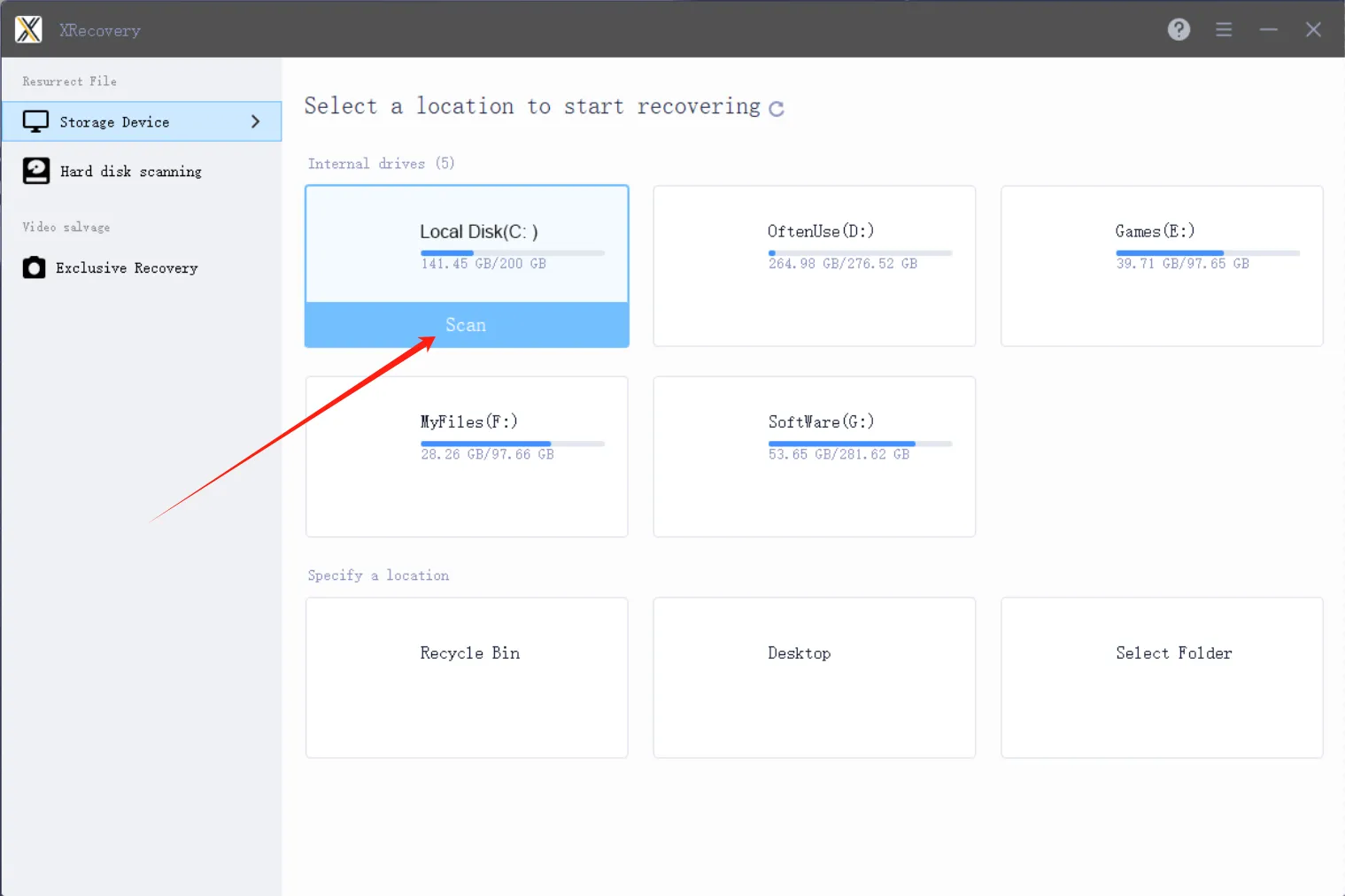
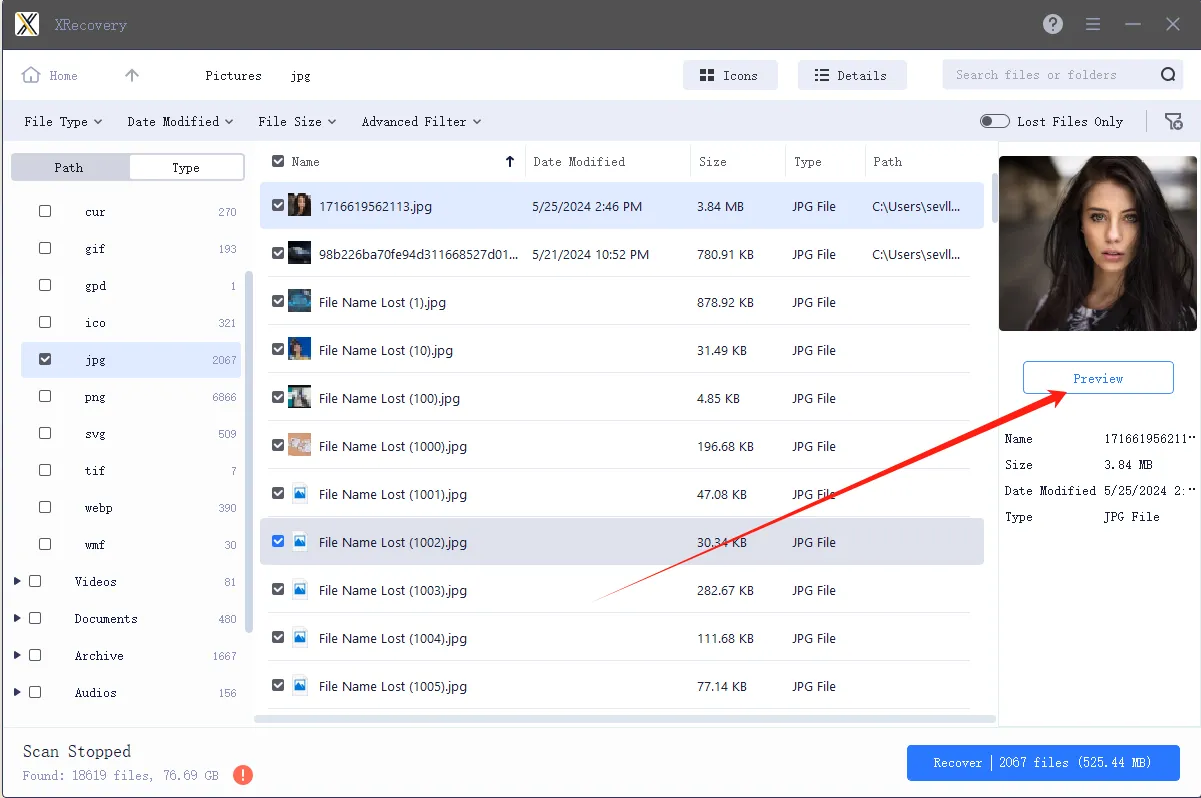
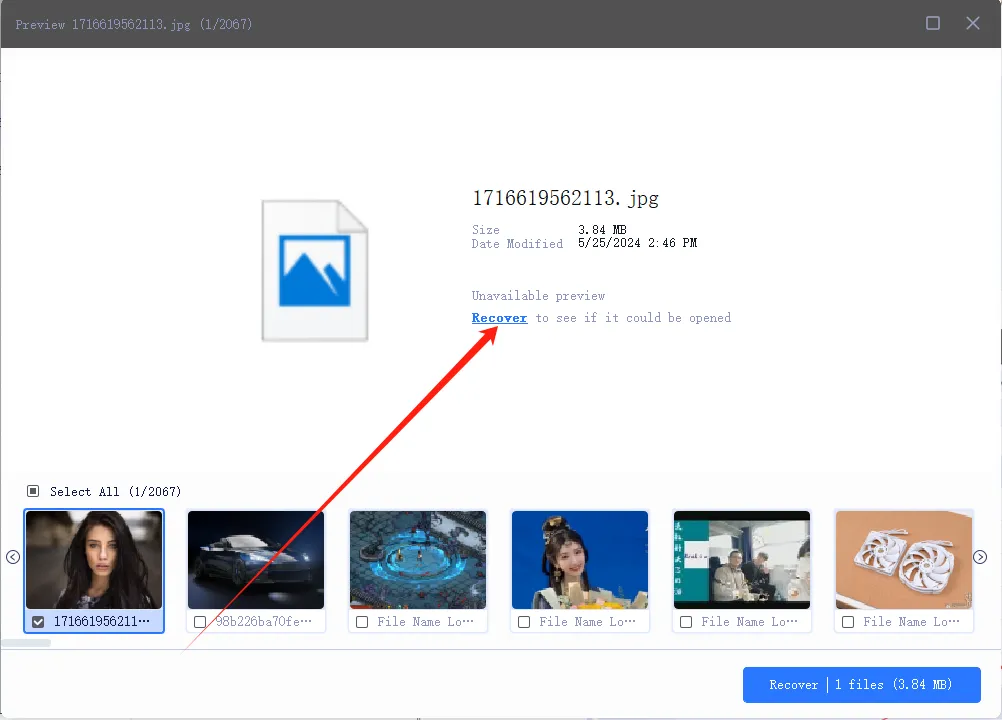
Recover Your Lost Files in Just 3 Simple Steps
Follow these simple steps to recover lost or deleted files with XRecovery for Windows
Customers and software guru say
Must thank @XAppset and their software XRecovery for helping me get these files back!

FAQ
Can deleted files be recovered?
In many cases, yes. The key is to stop writing to the affected drive and run a read-only scan as soon as possible to maximize recovery chances.
Can files be recovered after formatting?
Often yes, especially after a quick format. A deep scan can recover more fragmented or partially overwritten data.
Will recovered files be intact?
Most common files can be fully recovered. Heavily fragmented or partially overwritten files may be incomplete and could require repair.
Is XRecovery safe for non-technical users?
Yes. XRecovery uses a guided interface and defaults to read-only operations to minimize risk and simplify the recovery process.
How long does recovery take?
It depends on the drive size, condition, and scan type. A quick scan usually takes minutes; a deep sector-level scan can take hours. Avoid interrupting the process and ensure the device has stable power.