


Data Lost? We Can Get It Back.

Powerful & easy data recovery software to quickly retrieve your lost files from accidental deletion, formatted drives, and more.

Your Complete Data Recovery Solution

Accidental Deletion

Easily recover files deleted from your local drive.

Partition Recovery

Recover data after a partition has been formatted.

Corrupted Drives

File restoration from logical drive failures.

System Crash

Retrieve files after a operating system crash.

RAW Recovery

Process uninitialized or missing RAW partitions.

External Drives

Undelete files from external storage devices.

Memory Card

Recover pictures & documents from memory cards.

USB Flash Drive

Get files back from any type of USB drive.

Recycle Bin

Recover files even after emptying the Recycle Bin.

Photo Recovery

A specialized process for image file recovery.

Video Recovery

Restoring lost or missing video files.

Email Recovery

Support for major email client database recovery.

Why Choose XRecovery?

Simple Interface

No technical skills required. Our intuitive wizard guides you through every step.


Deep Scanning Modes

Multiple scan options from Quick Scan to Deep Scan ensure maximum results.


Widespread File Support

Supports thousands of file types for photos, videos, documents, and archives.


Risk-Free Operation

Our software reads your data without modification, ensuring zero risk.


Recover Your Lost Files in Just 3 Simple Steps

Follow these simple steps to recover lost or deleted files with XRecovery for Windows

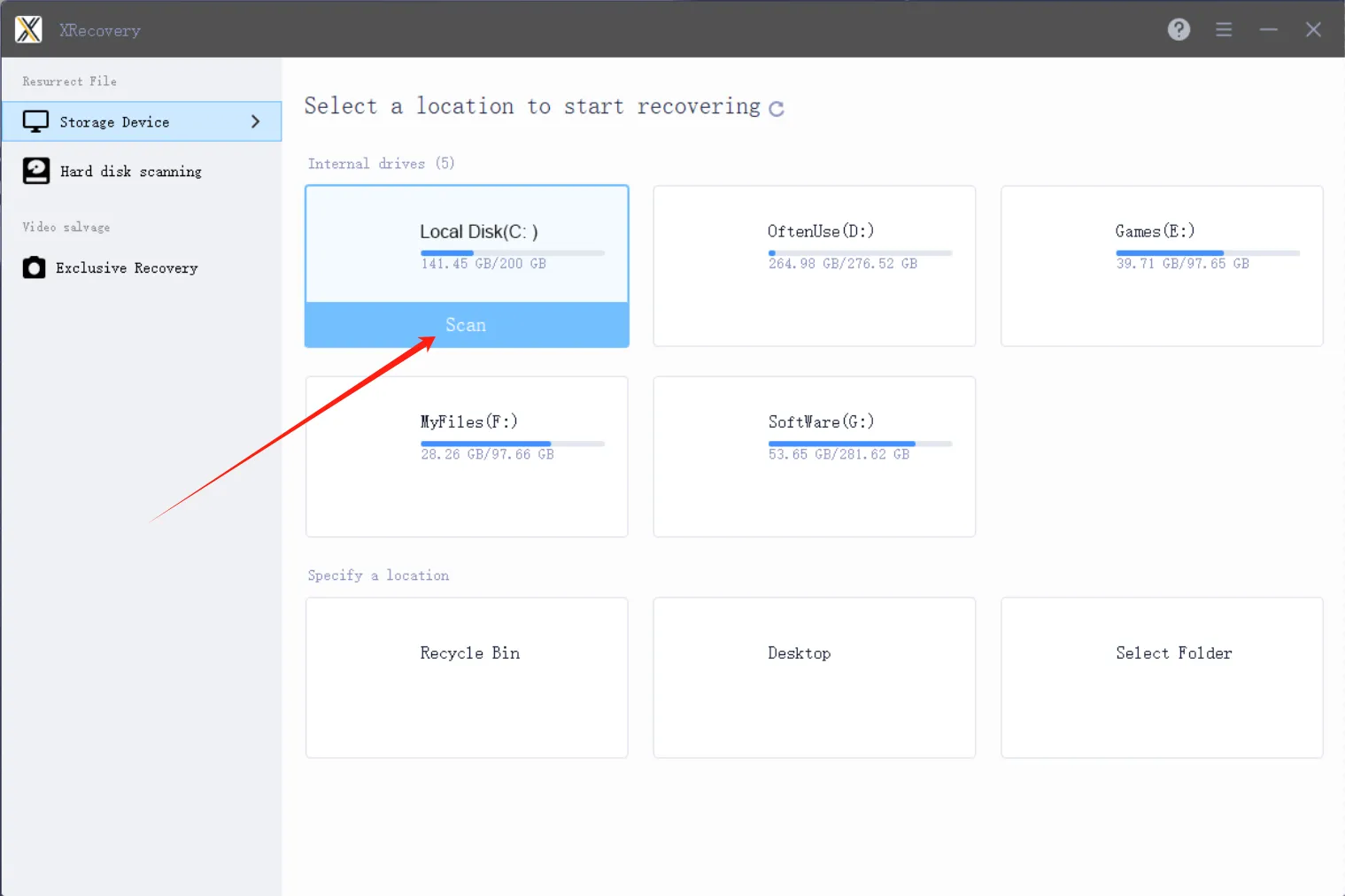
Step 1

Start Scanning for Lost Hard Drive Data

Launch XRecovery and select the disk to scan

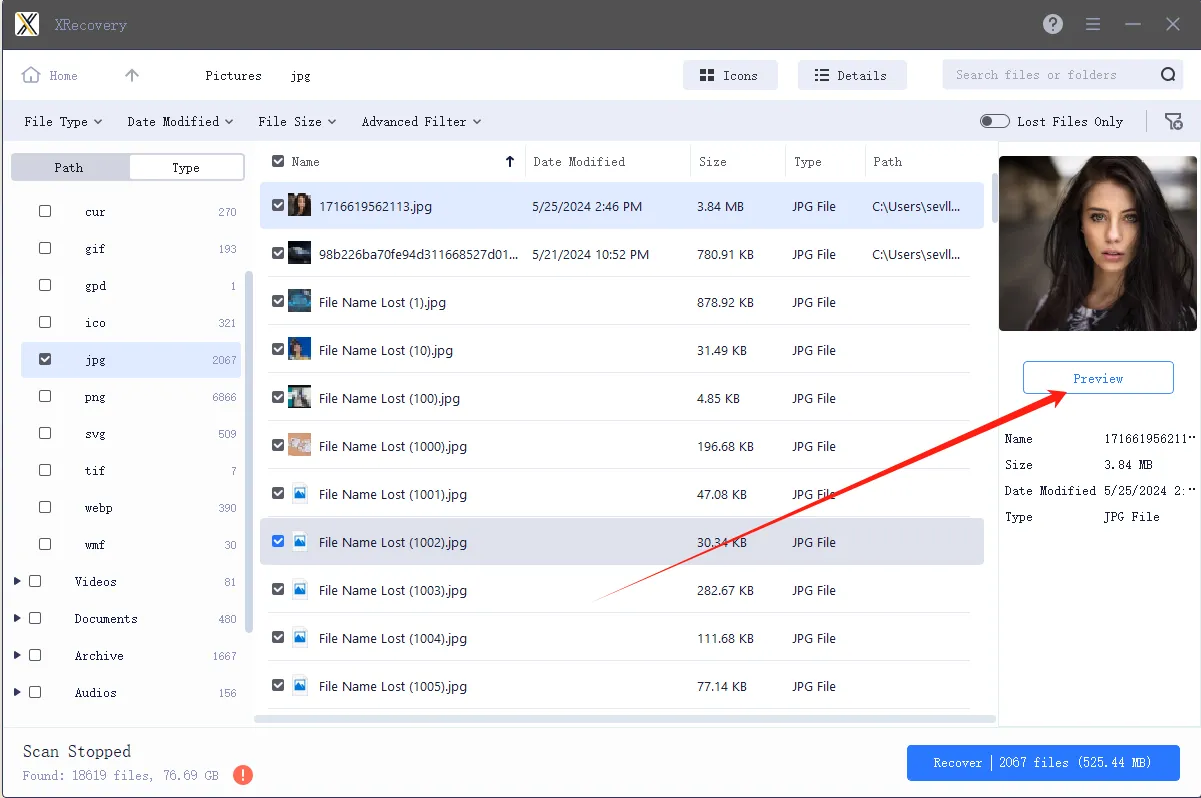
Step 2

Select Which Files You Want to Recover from Your Hard Drive

Locate and preview the lost or deleted files

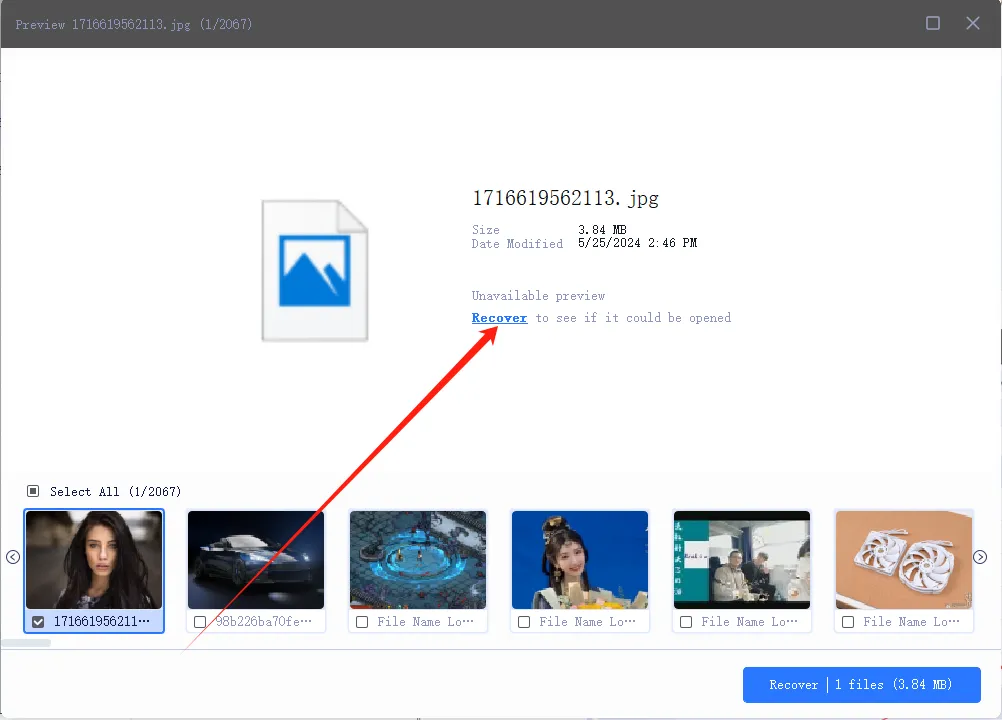
Step 3

Recover the Deleted Hard Drive Data

Restore your data with one click

Customers and software guru say

Ela Orleans
Ela Orleans
Digital reviewer
The free version of XRecovery comes with no functional limitations and delivers an impressively high success rate. I can use the free quota every day without restrictions, and the Pro version is very reasonably priced. I rely on it constantly—it’s become an essential part of my workflow.

John Doe
John Doe
Sound and visual artist
After a hard drive failure, I lost several critical files for upcoming video projects. Huge thanks to @XAppset and their software XRecovery for helping me recover everything I needed. Truly a lifesaver.

John Doe
John Doe
Video creator
Due to hard drive corruption some very important files of some upcoming videos have been lost.
Must thank @XAppset and their software XRecovery for helping me get these files back!

FAQ

In many cases, yes. The key is to stop writing to the affected drive and run a read-only scan as soon as possible to maximize recovery chances.

Often yes, especially after a quick format. A deep scan can recover more fragmented or partially overwritten data.

Most common files can be fully recovered. Heavily fragmented or partially overwritten files may be incomplete and could require repair.

Yes. XRecovery uses a guided interface and defaults to read-only operations to minimize risk and simplify the recovery process.

It depends on the drive size, condition, and scan type. A quick scan usually takes minutes; a deep sector-level scan can take hours. Avoid interrupting the process and ensure the device has stable power.

All Files, All Formats, All Devices Restore
Your Lost Data Efficiently