Recuva vs. XRecovery: Feature Comparison and Upgrade Value
Recuva was once a leading recovery tool, but it hasn’t received significant updates since 2016. XRecovery retains popular features and introduces key improvements. Let’s compare these improvements.

VS

Simplifying Choices: Comparing Operations for the Everyday User
operation comparison simplified: anon-experts guide


XRecovery has a simple and intuitive interface, and it only takes 3 steps to get lost data
Recuva’s setup wizard guides users through its features, but its multi-step process may slow down beginners.
Preview during scan


XRecovery allows real-time preview and recovery of visible files during scanning.
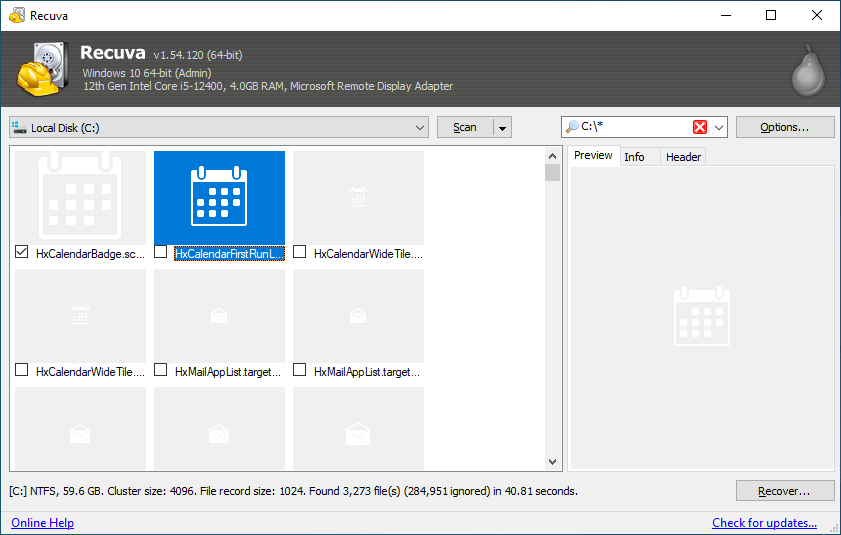
Recuva shows a progress bar but lacks real-time file visibility, which may frustrate users scanning large drives.
Preview function (necessary evaluation before upgrading)

XRecovery’s powerful preview feature allows you to evaluate your data at any time. If the data is previewable, it can be directly recovered, saving time.
This also lets you assess whether an upgrade to the PRO version is needed. Users can evaluate recoverable files before upgrading, avoiding blind purchases.
Recuva only provides a progress bar during the scanning process, leaving users uncertain about recovery outcomes. When scanning large devices, users have to invest a lot of time. In addition, complex files such as videos and office documents cannot be previewed.
If you want to try their pro version, you have to pay before knowing the recovery results.
XRecovery | Recuva | |
Quick Scan Free | ✔
| ✔
|
Lost Partition Quick Scan Free | ✔
| ✔
|
Video/Photo Recovery Enhancement | ✔
| ❌
|
Free quota with the same functions as the PRO version | ✔
| ❌
|
Daily Free Quota (Full PRO Features) | ✔
| ❌
|
Preview | Fully supported | Limited support |
Modern UI | User-friendly | Difficult to operate |
Choosing the right data recovery software depends significantly on its features and cost structure. Recuva’s free version has limited features and often prompts users to upgrade to the PRO version for complete file recovery, especially when critical data is lost.
In contrast, XRecovery provides a fully-featured free version without hidden fees or limitations. This ensures that users can efficiently recover the files they need. Here are the key benefits of choosing XRecovery’s fully functional free version:
Key Benefits of XRecovery's Fully Functional Free Version
Unlimited Access:
XRecovery’s free version includes all core recovery features without restrictions.
Whether you accidentally deleted a document, lost photos, or need to recover data from formatted drives, XRecovery helps you efficiently retrieve important files.
No Hidden Costs:
Unlike Recuva, which often requires users to upgrade for vital functionalities, XRecovery’s free version provides full access to all recovery features. You can use the software to its fullest potential without unexpected costs, ensuring an economical choice for users.
Intuitive Design:
XRecovery’s interface is streamlined for users of all technical levels. It offers an intuitive interface. This allows anyone, regardless of technical expertise, to navigate and recover lost files quickly. This ease of use is a significant advantage. It is particularly beneficial for those who may not be tech-savvy.
Comprehensive Support:
While other free versions may leave users without support, XRecovery offers robust customer service and resources to assist users during the recovery process. Whether you have questions or need guidance, you can rely on XRecovery’s support team.
Frequent Updates and Improvements:
XRecovery regularly updates its software to enhance features, improve recovery algorithms, and ensure compatibility with the latest operating systems and file systems. Our commitment to innovation equips users with the latest tools for effective data recovery.
Conclusion
When faced with data loss, having the right recovery tool is vital. While Recuva offers a limited free version with frequent upgrade prompts and limited free functionality, XRecovery delivers a fully functional free version with unlimited recovery capabilities. This ensures that you can recover your important files without unnecessary costs or limitations. Choose XRecovery for a reliable and effective solution to your data recovery needs. Recover your files confidently—without hidden costs or technical barriers.Try it Now!